Update and back up the panel
Keep RDockPanel up to date, back up its own data, and go back to an earlier version when needed.
See what you run
Settings → Version shows the panel's version and Channel, what it runs with (RustCMS Core, Traefik, MySQL or SQLite, Docker, the OS), the latest release and when it was last checked.
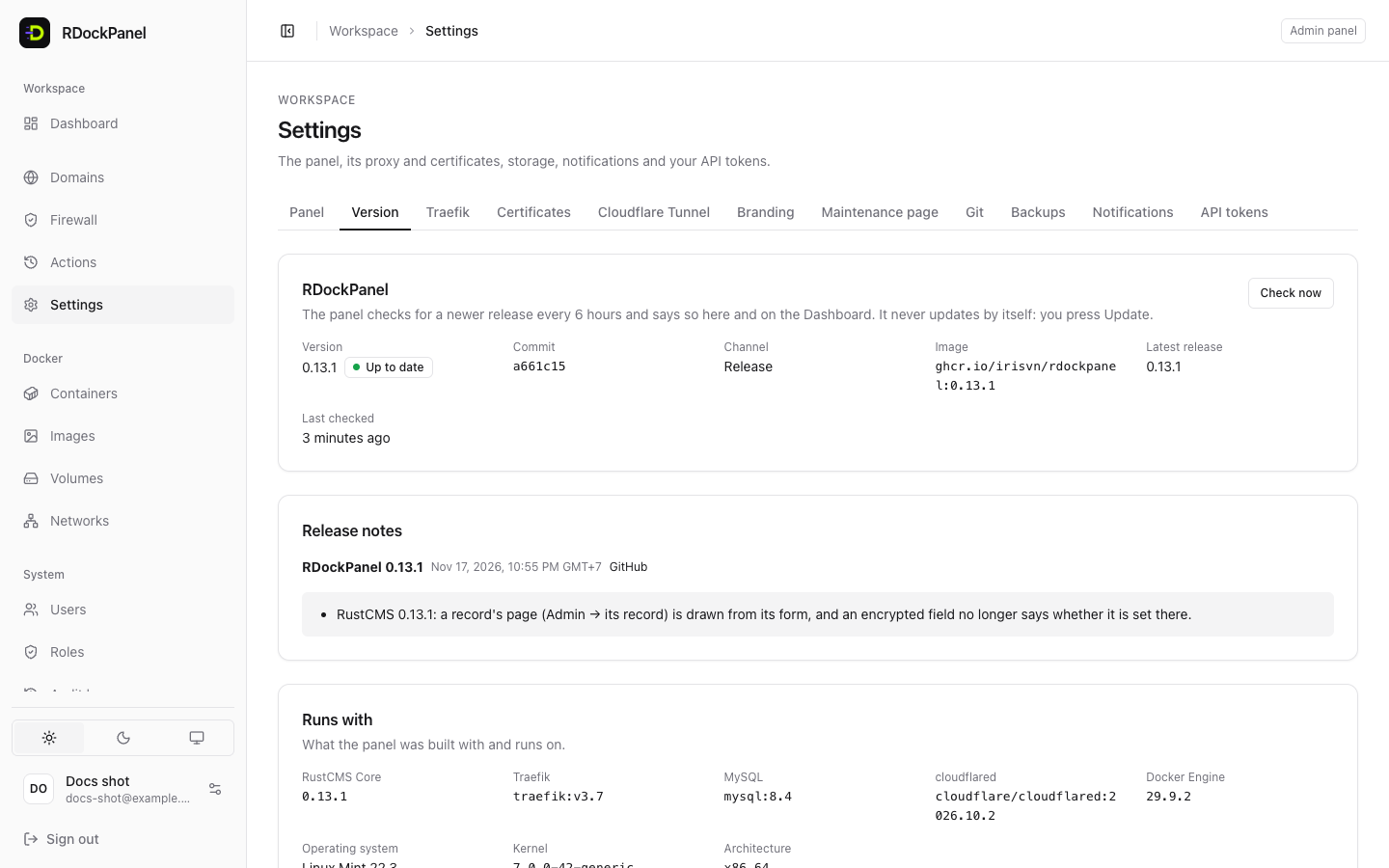
The channel depends on how the panel was installed:
| Channel | Installed with | Update button |
|---|---|---|
| Release | --version X.Y.Z | yes |
| Development build (main) | no --version (the main image) | no: not compared with releases |
A release's panel checks for a newer release every 6 hours (Check now checks at once). When one is out, Settings → Version and the Dashboard say so to administrators, with What changed.
Update from the panel
The panel never updates by itself: an administrator presses the button.
- Open Settings → Version and press Update to X.Y.Z.
- Read the confirmation and confirm. Then the panel:
- lets running deployments, backups and restores end, and makes new ones wait;
- copies its database to
/var/lib/rdockpanel/backups/panel/(no copy, no update); - asks Swarm to replace it. The panel is unavailable for about a minute; your services keep running.
- When the new version is up, the page says "RDockPanel X.Y.Z runs now." Press Reload the page.
If the new version does not start, Swarm goes back to the previous one by itself. The History section of Settings → Version records each version change and restart.
From the server
The same page shows the Installer command for that release. Running it as root on the server does the same update and keeps your settings:
curl -fsSL https://raw.githubusercontent.com/irisvn/rdockpanel/main/install/install.sh \
  | sudo sh -s -- --version X.Y.Z
Old versions (same page) removes the stopped containers of old tasks and their images, to free disk space. The running version and the one before it are always kept.
Back up the panel
Your apps' databases are backed up from their own Backups tab (see Databases and backups). The panel's own data needs two things:
/etc/rdockpanel: its secrets (includingAPP_KEY) and certificates. On a Mac,~/.rdockpanel.Its database:
MySQL: run
mysqldump panelinside therdp-mysqlcontainer:shc=$(docker ps -q -f name=rdp-mysql) docker exec "$c" sh -c 'MYSQL_PWD="$(cat /run/secrets/rdp_mysql_root)" mysqldump -uroot panel' \ > /root/rdockpanel-panel.sqlSQLite: stop the panel, copy the whole
/var/lib/rdockpanel/datafolder, start it again:shdocker service scale rdockpanel=0 # wait until `docker ps` shows no rdockpanel container cp -a /var/lib/rdockpanel/data /root/rdockpanel-data-backup docker service scale rdockpanel=1
Or keep the copy that each Update makes in
/var/lib/rdockpanel/backups/panel/(one self-contained file).
SQLite: panel.sqlite alone is not a backup
The latest changes may still be in panel.sqlite-wal. Copy the whole folder, with the panel stopped.
Keep APP_KEY safe
Losing APP_KEY loses the encrypted environment variables, registry passwords and file mounts. Store the backup of /etc/rdockpanel off the server.
Roll back to an earlier version
Install the earlier release with the installer:
curl -fsSL https://raw.githubusercontent.com/irisvn/rdockpanel/main/install/install.sh \
  | sudo sh -s -- --version 0.13.0
Since 0.5.0, an older version runs on the database as the newer one left it (Settings → Version then lists the newer migrations). To undo what a release changed in the database, restore the copy the update made, made by that same version:
MySQL (the file
rdockpanel-<version>-<time>-<id>.sql):shc=$(docker ps -q -f name=rdp-mysql) docker exec -i "$c" sh -c 'MYSQL_PWD="$(cat /run/secrets/rdp_mysql_root)" mysql -uroot' \ < /var/lib/rdockpanel/backups/panel/rdockpanel-0.13.0-….sqlSQLite (the file
rdockpanel-<version>-<time>-<id>.sqlite): install that version, stop the panel and wait until its container is gone, remove the old-waland-shmfiles, put the copy in place, start it:shdocker service scale rdockpanel=0 cd /var/lib/rdockpanel/data rm -f panel.sqlite-wal panel.sqlite-shm cp /var/lib/rdockpanel/backups/panel/rdockpanel-0.13.0-….sqlite panel.sqlite docker service scale rdockpanel=1
Good to know
- The installer, run without
--versionor--image, keeps a newer release the panel updated to. - The panel does not update while an import runs.
- Before going back to a release older than 0.12.0, keep the Cloudflare tunnel
defaulton (or remove the other tunnels) and finish or undo the imports under way. --upgrade-systemalso pulls a newer patch of MySQL 8.4 and Traefik v3.7.