Web application firewall (WAF)
The WAF page (in the menu, next to Firewall) turns on a firewall that reads every request to your services' domains and stops known attacks before they reach your app. Its tabs: Overview, Alerts, Rules, IP lists, Cloudflare and Settings.
How it works
The panel runs CrowdSec's WAF (its AppSec engine) as a service of its own, rdp-crowdsec, and gives Traefik a plugin that asks it about each request:
 visitor ──► Traefik ──► blocklist ──► WAF plugin ──ask──► rdp-crowdsec (rules)
                            │              │  ◄── allow / block ──┘
                            │              ├── allowed ──► your app
└──────────────┴── blocked ──► 403 Forbidden- Only your services' domains go through it. The panel's own address and HTTPS certificate checks never do, so you can always reach the panel to change a setting.
- The request's body is read first (its first 1 MB is checked; larger uploads pass whole, the rest unchecked), then the request goes on unchanged. A request holds at most about 1 MB of Traefik's memory: the rest of a large upload waits in a temporary file.
- The visitor's real address is used, also behind Cloudflare and the Cloudflare Tunnel.
- If the WAF fails (CrowdSec stopped, slow, or its plugin not loaded), requests go through unchecked: a site is never taken down by the WAF. The Overview tab says so.
Modes and levels
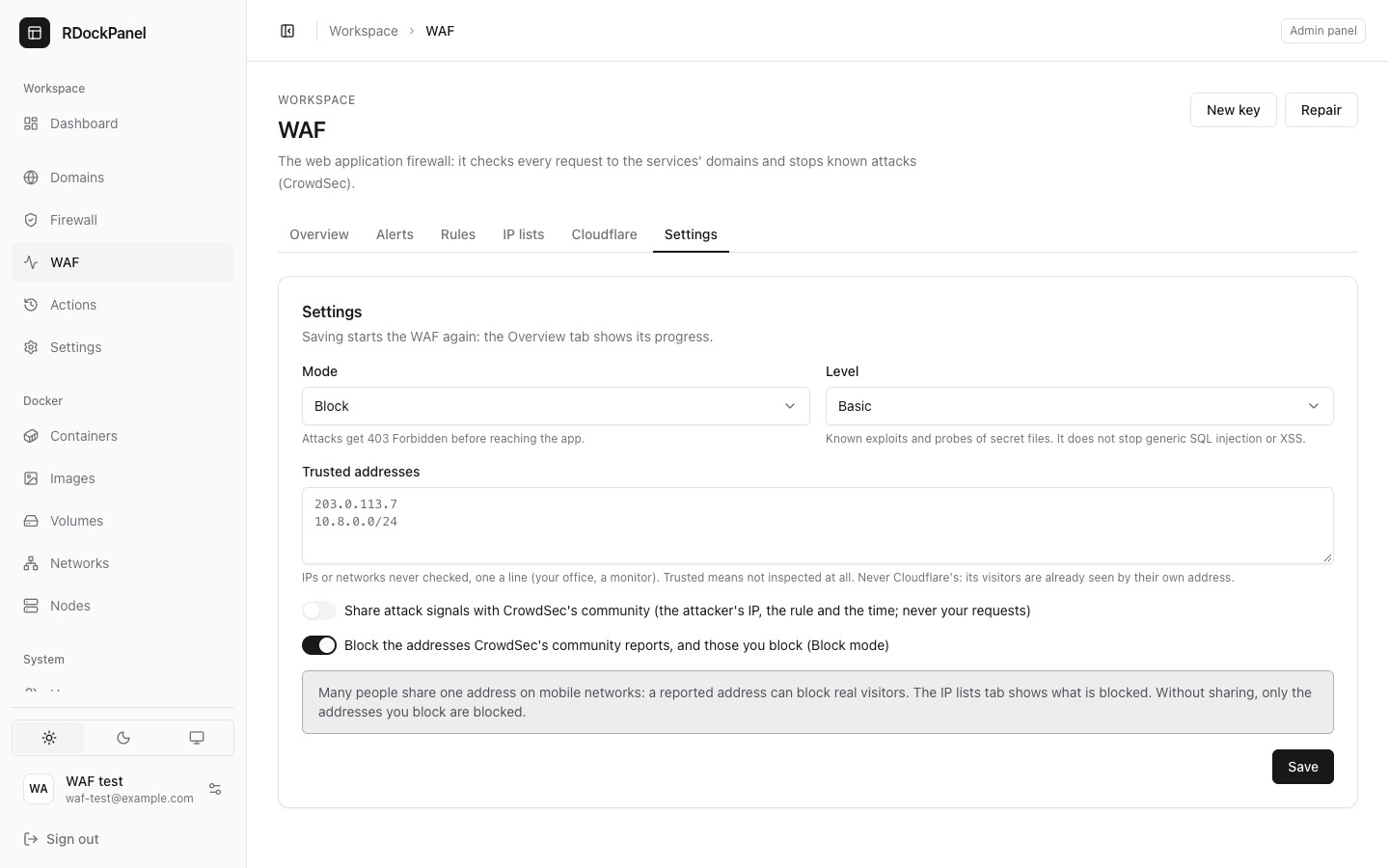
On the Settings tab:
| Mode | What happens |
|---|---|
| Off | Nothing is checked. CrowdSec is stopped. |
| Detect only | Attacks are recorded, never stopped. Start here for a week and read the alerts. |
| Block | Attacks get 403 Forbidden before reaching the app. |
| Level | Stops |
|---|---|
| Basic | Known exploits of popular software (virtual patches for published CVEs) and probes of secret files (/.env, backups…). It does not stop generic SQL injection or XSS. |
| Strict | Basic, plus the OWASP Core Rule Set: SQL injection, XSS, path traversal and more. It can block legitimate requests: try it in Detect first. |
Turn it on
- Open WAF → Settings.
- Choose Detect only and a level, press Save. The Overview tab shows the start step by step: copying the plugin and rules, starting CrowdSec, giving Traefik the plugin, then checking (CrowdSec loads its rules: about half a minute). A timer shows how long it has run, and View log opens the same steps in the Actions page. After three minutes at most it ends On or Unavailable with the reason.
- Look at Alerts for a few days. A legitimate request in the list (a false positive)? Spare its domain that rule (see Exceptions), trust its address, or turn the WAF off for that service.
- Switch to Block.
The first start, and turning it off and on, restart Traefik once: every domain pauses for a few seconds.
Settings → Panel → System lists the WAF next to Traefik and Docker: its state, its mode, its CrowdSec logs, Open (the WAF page), Repair and Restart CrowdSec.
Overview: requests and statistics
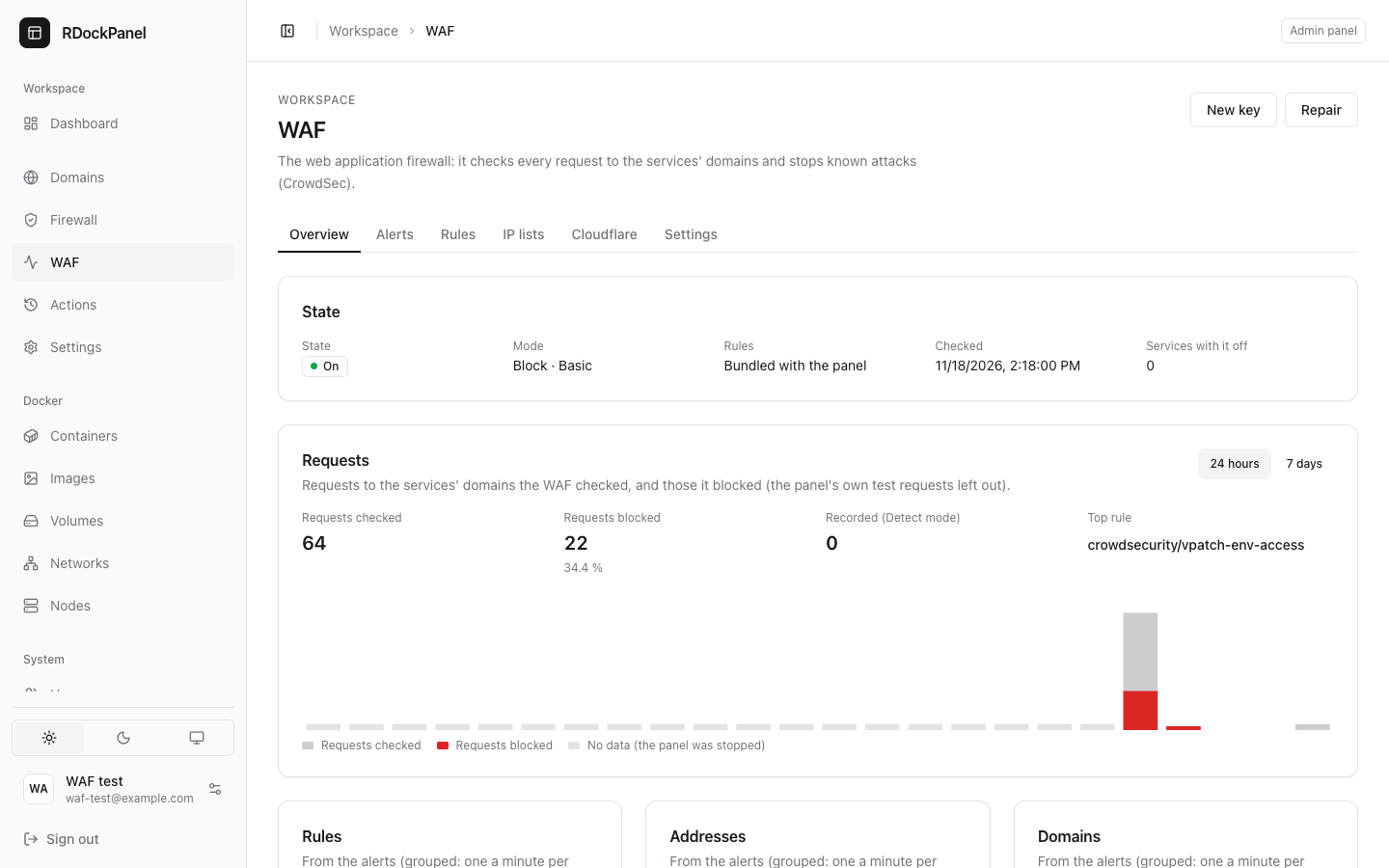
- Requests checked and Requests blocked over 24 hours or 7 days, hour by hour. The panel reads CrowdSec's counters every minute and keeps one row an hour (90 days). Its own test requests are left out. An hour the panel was stopped shows as a gap, never as zero.
- Recorded (Detect mode): attacks recorded without being stopped.
- The top rules, addresses and domains of the alerts.
Alerts
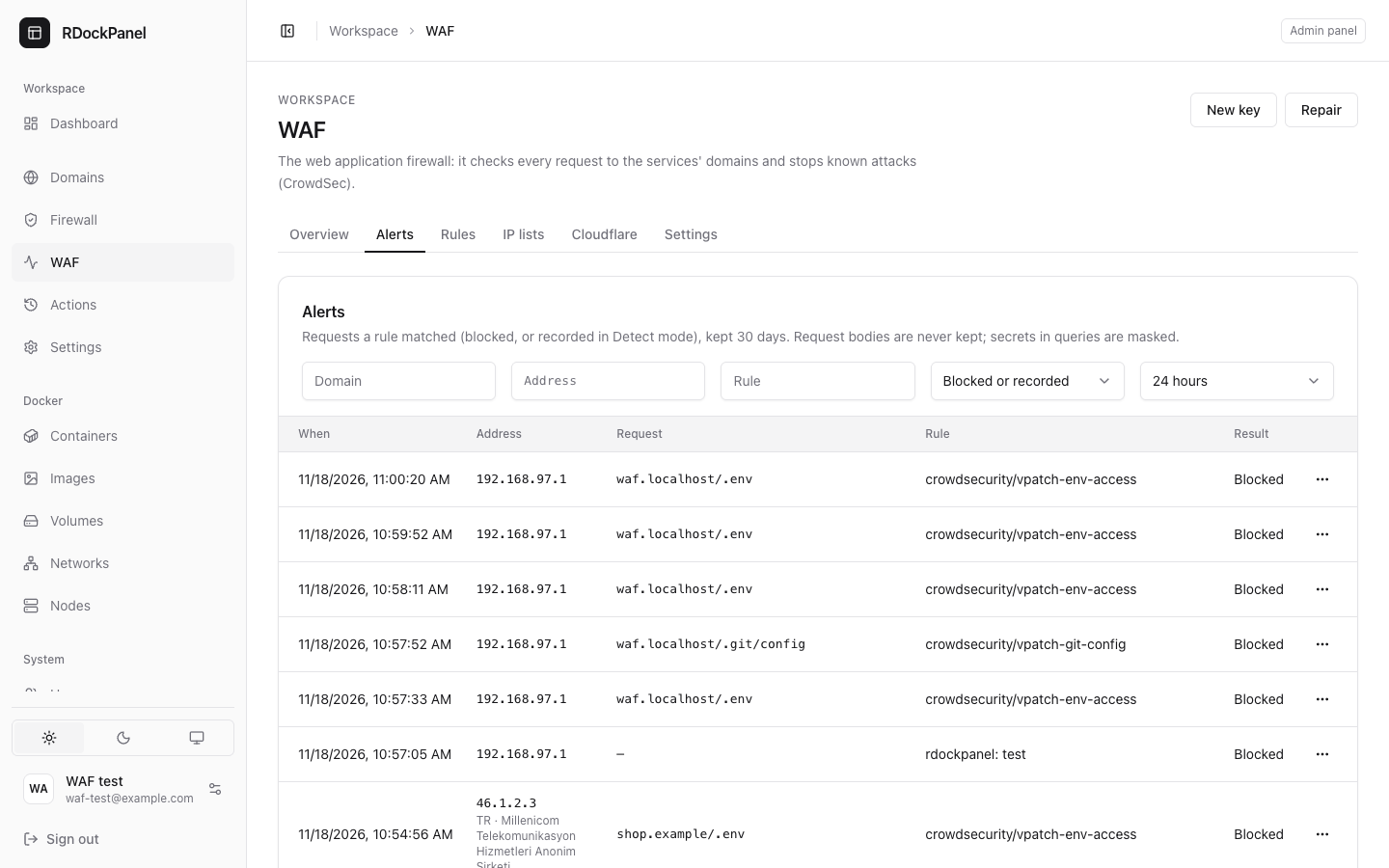
Every request a rule matched: blocked (Block mode) or recorded (Detect mode). The panel copies them from CrowdSec every minute into its own database and keeps them 30 days, 25 a page, filtered by domain, address, rule, result and period. A row shows the time, the address (country and network when known), the domain and path, and the rule (OWASP CRS: sql_injection for the Core Rule Set).
- Request bodies are never kept. Values in the query that look secret (
token,password,key…) are masked as***. - Detect mode groups the same address and path to one alert a minute.
- At most 1,000 alerts a minute are copied (the newest); under a flood beyond that, the statistics still count every request.
- A row's menu: Details, Spare the domain this rule, Block the address, Trust the address.
Rules
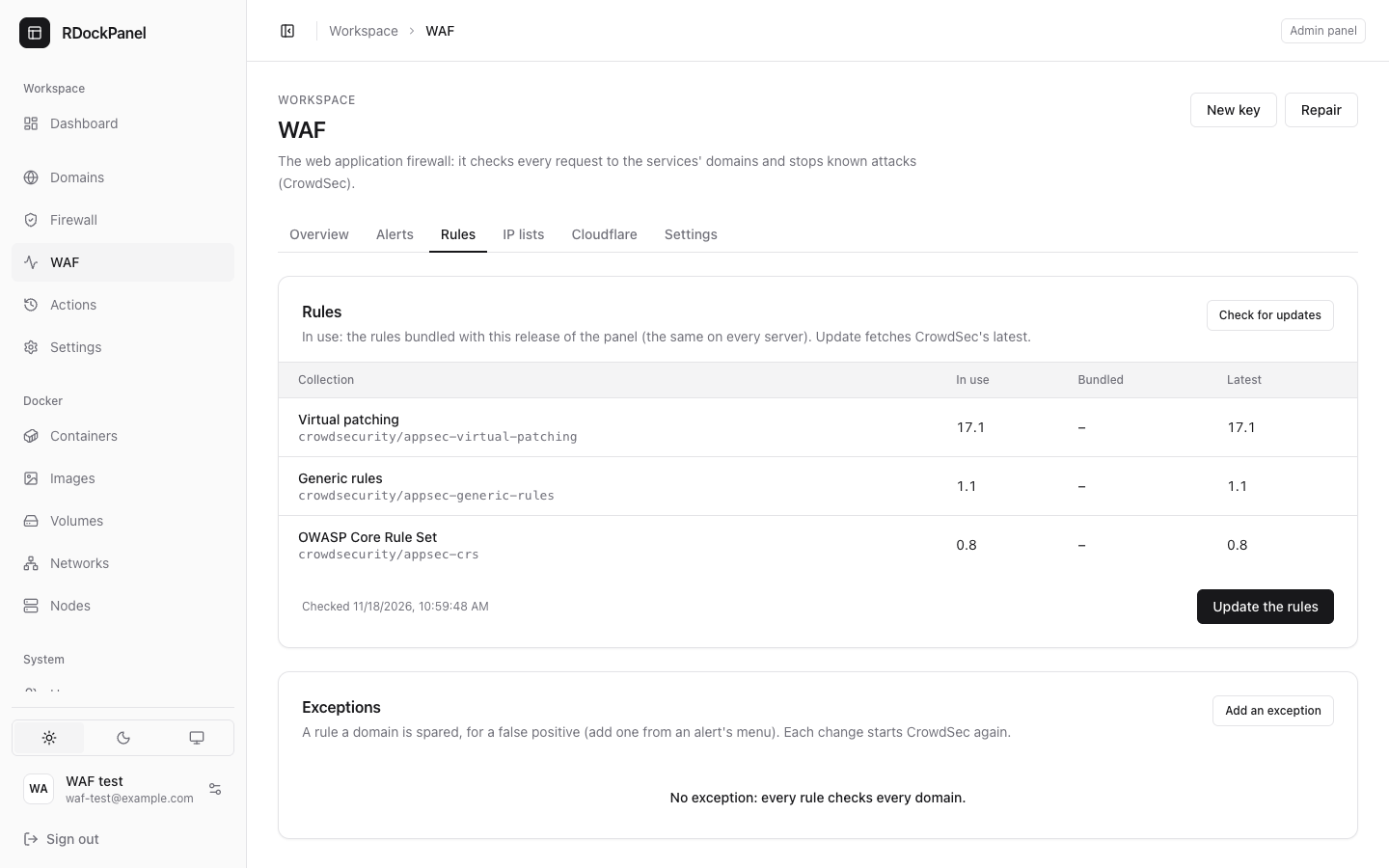
CrowdSec's rules come in three collections: Virtual patching, Generic rules and the OWASP Core Rule Set. The Rules tab shows the version in use, the one bundled with this release and the latest at CrowdSec.
- Bundled (the default): the rules fetched when the panel's release was built. CrowdSec starts from them without the internet, and every server of a release has the same rules.
- Check for updates asks CrowdSec's hub (once a day the panel also checks by itself, while the WAF is on). A newer collection shows as newer.
- Update the rules fetches the latest and starts CrowdSec again with them (about a minute, requests go through unchecked meanwhile); its log opens as it runs. If CrowdSec does not start with them, the bundled rules come back by themselves. The rules stay on latest afterwards, and CrowdSec keeps them across restarts.
- Back to the bundle returns to the release's rules.
Exceptions
A false positive (a legitimate request blocked) is usually one rule on one domain. An exception spares that domain that rule, and only that one: every other rule still checks it, and the rule still checks every other domain.
- From an alert: its menu, Spare the domain this rule. The panel takes the rule that caught the request (a Core Rule Set id like
942100, or a name likecrowdsecurity/vpatch-env-access). - By hand: Rules → Add an exception, the rule and the domain (no wildcard).
- Each change starts CrowdSec again (about a minute). At most 100 exceptions.
IP lists: the blocklist
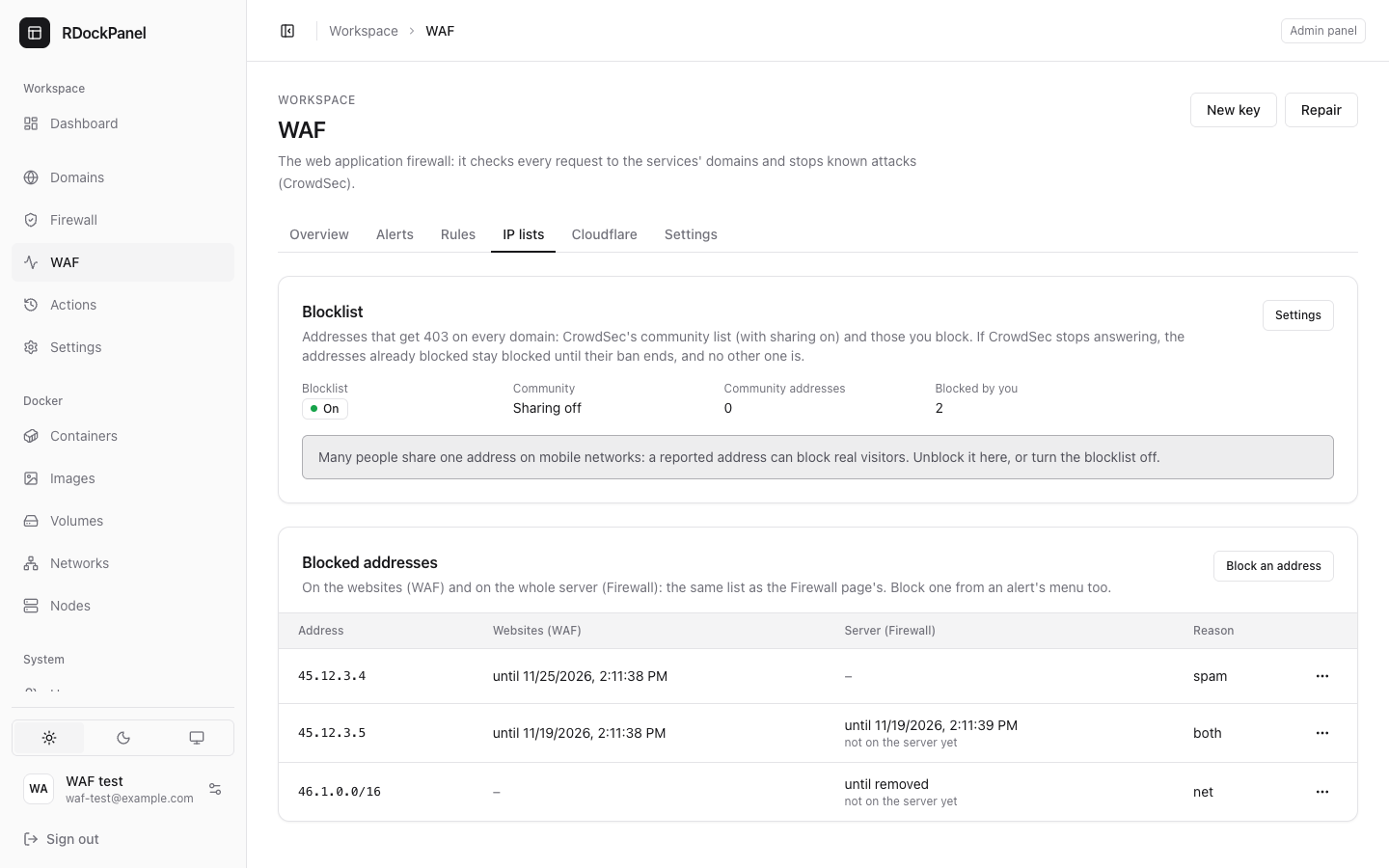
Off by default. Turned on in Settings (Block the addresses CrowdSec's community reports, and those you block), it works in Block mode only. A second plugin in front of the WAF keeps a copy of CrowdSec's list of banned addresses (refreshed every ten seconds) and answers them 403 on every domain, before any rule runs.
- Addresses you block: from the IP lists tab, the Firewall page or an alert's menu (see Blocking an address).
- The community's: with sharing on, CrowdSec also receives the addresses its community reports. Without sharing, only the addresses you block are blocked.
- CrowdSec's own detections are never turned into bans: an alert is an alert, a ban is your decision or the community's.
- Risk: on mobile networks and some ISPs many people share one address (CGNAT). A reported address can then block real visitors. The tab shows what is blocked; unblock an address there, or turn the blocklist off.
- If CrowdSec stops answering, the addresses already blocked stay blocked until their ban ends (the plugin keeps its copy of the list), and no other visitor is ever blocked.
Blocking an address: websites or server
One dialog, on the WAF page (IP lists, an alert's menu) and on the Firewall page, blocks an address on two layers. Tick one or both:
| On the websites (WAF) | On the whole server (Firewall) | |
|---|---|---|
| What it stops | Every domain of your services (403) | Everything but SSH: every site and the panel |
| Visitors through Cloudflare's proxy or the Tunnel | Blocked (the WAF reads their own address) | Not blocked: the server sees Cloudflare, not them |
| What it takes | One address | An address or a network (203.0.113.0/24) |
| For | A day, a week or thirty days | The same, or until removed |
| Takes effect | Within ten seconds (blocklist on, Block mode) | At once (firewall on, Linux installs) |
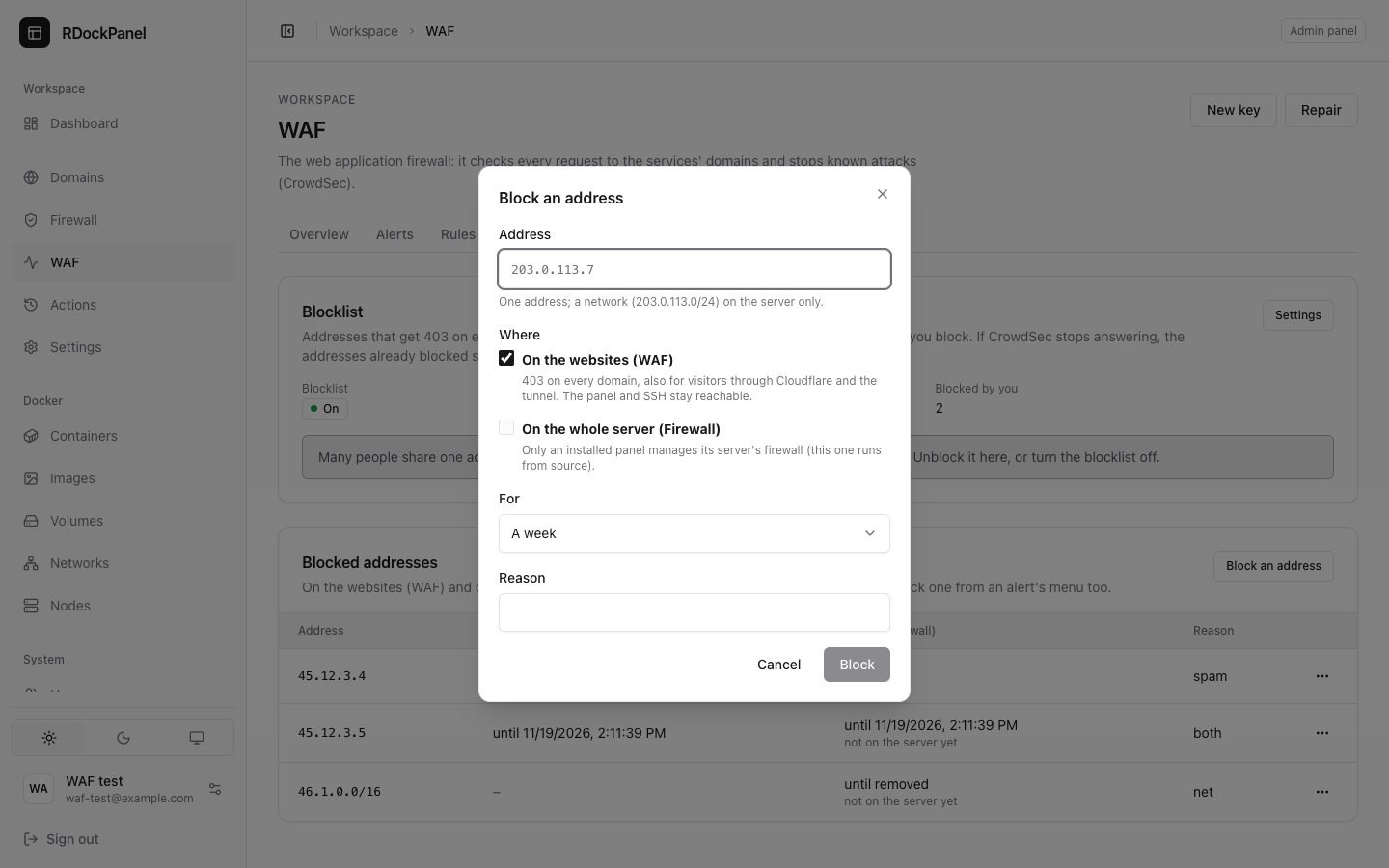
- Both pages show the same list: each address with where it is blocked and until when. Its menu unblocks it everywhere, on the websites only or on the server only.
- Never blocked, on either layer: Cloudflare's ranges (every visitor coming through them would be), every address (
/0), and the address you are using (you would lose the panel or your sites). The dialog says so before you press Block. - On the server, a block is applied at once, without the Firewall's "try, then keep" step: blocking or unblocking an address cannot lock you out (blocked addresses still reach SSH, and yours is refused). Openings you saved but did not apply stay drafts. If a firewall change is waiting to be kept, the block is saved and applied as soon as that change is kept or reverted (the list shows "not on the server yet" meanwhile; the panel checks every minute).
- A block with an end is removed when it ends (checked every five minutes), and the firewall is applied again without it. CrowdSec ends the WAF's by itself.
Which one? A visitor attacking your sites: the websites (it works behind Cloudflare). A machine probing the ports you opened, or a whole network you never want reaching the server: the server. SSH stays open to blocked addresses on purpose (nobody locks themselves out): protect it with keys and your provider's firewall.
Cloudflare's addresses
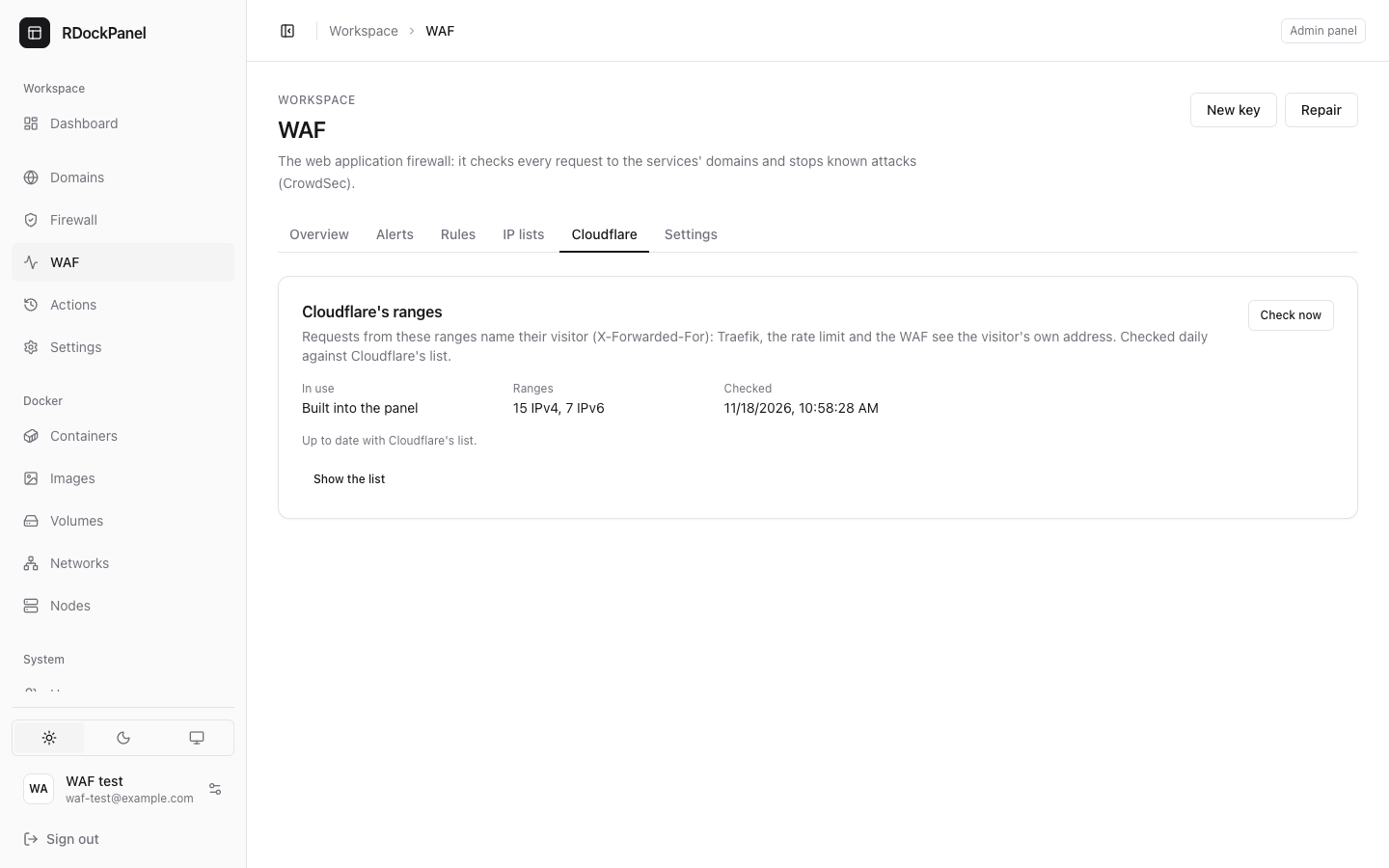
Requests that come through Cloudflare carry the visitor's address in a header. Traefik, the rate limit and the WAF trust that header only from Cloudflare's own ranges, so they need Cloudflare's current list.
- The panel checks Cloudflare's published list once a day (and on Check now).
- A list that only drops ranges is applied at once. New ranges are offered: Apply them (Traefik restarts, a few seconds), and the notification channels that hear Traefik's events are told. Until then their visitors are seen as Cloudflare's address.
- A list that looks wrong (private or huge ranges, too few, half of them changed) is refused and the ranges in use are kept: the tab shows the error.
- The installer uses the same list when it runs again.
Per service
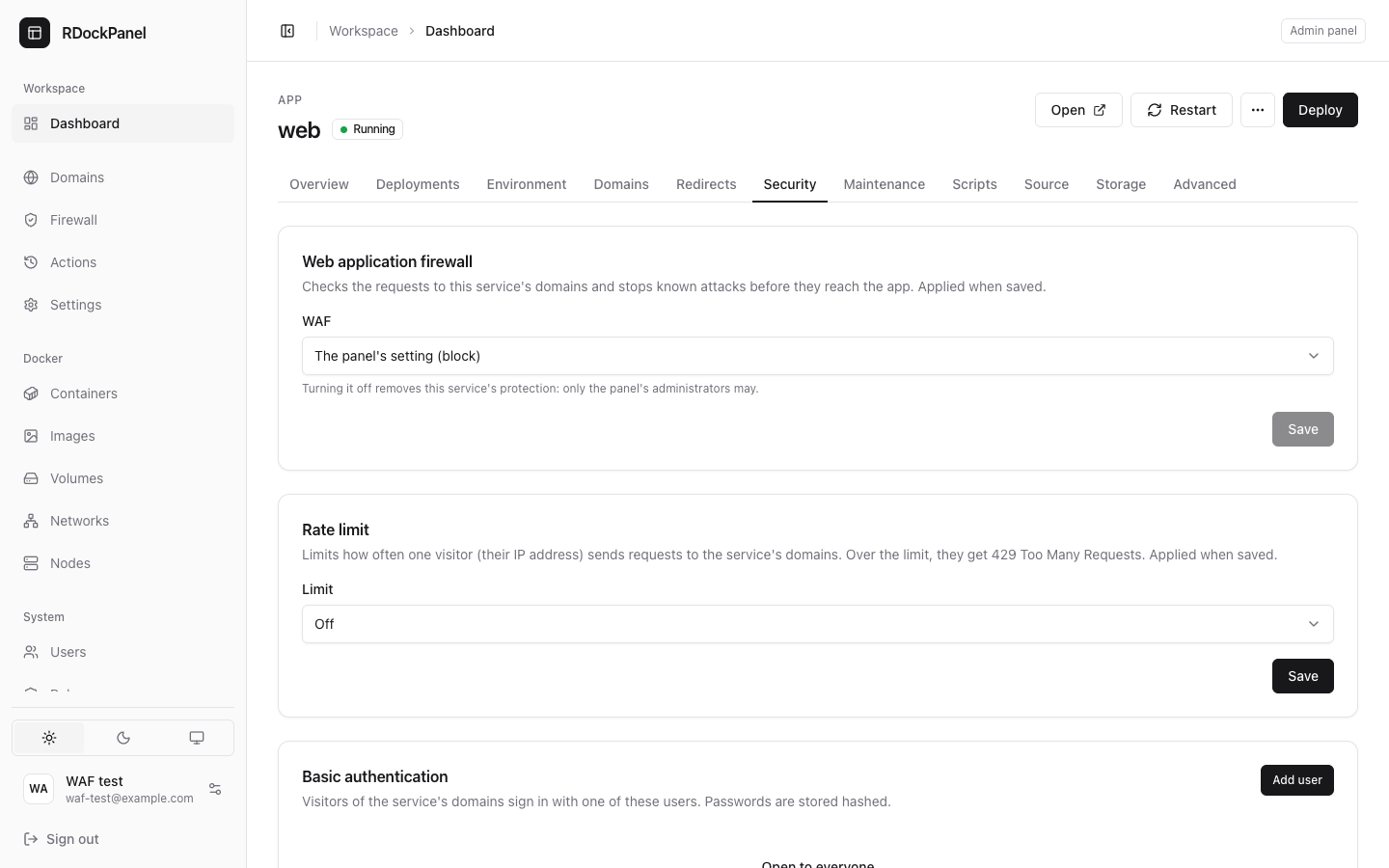
A service follows the panel's setting. On its Security tab you can set it to On or Off:
- Off removes that service's protection: only the panel's administrators may.
- Anyone who may change the service may set it back to the panel's setting or On.
It applies when saved, without redeploying.
States
| State | Meaning | What to do |
|---|---|---|
| On | The panel checked a moment ago: a test attack was blocked. | Nothing. |
| Starting | The panel is starting it: the Overview shows the step. | Wait (three minutes at most). |
| Stopping | Turned off: the panel is taking it off the routes and stopping CrowdSec. | Wait a few seconds. |
| Unavailable | Requests go through unchecked; the reason is shown. | Press Repair. Still unavailable? See the reason and the log. |
| Off | The WAF is off. | — |
Every minute the panel sends a normal request and test attacks through hidden routes of its own: the file probe must be blocked, at the Strict level an SQL injection too, and in Detect mode CrowdSec must count the attack it was shown. If Traefik could not load the plugin, the panel switches the sites to unchecked and starts Traefik again to load it (at most once every ten minutes). These test requests never appear in the alerts or the statistics.
When the WAF becomes Unavailable, and when it is On again, the notification channels that hear Traefik's events are told (Settings → Notifications).
The key between Traefik and CrowdSec
Traefik asks CrowdSec with a key the panel makes (a Docker secret: never in the database, never shown). New key (the WAF page's header) makes another: CrowdSec, then Traefik get it (Traefik restarts: a few seconds' pause), and the old one is removed once the new one works. Interrupted, the old key keeps working.
Removing it
Turn it Off: CrowdSec stops, the routes go without it. To remove everything it made (CrowdSec, its volumes and keys, the plugin in Traefik), run the installer with --remove-waf after turning it off.
Who sees what
| User | Sees |
|---|---|
Panel administrator (system.manage) | The WAF page and its System row: state, statistics, alerts, rules, exceptions, IP lists, Cloudflare's ranges, settings, New key, Repair; turns a service's WAF off. |
| May change a service | Its WAF setting; can set it back on, not off. |
| Others | Nothing of it. |
Every change (settings, exceptions, rules update, blocks, Cloudflare's ranges) is in the audit log; starts, rules updates and restarts are also in the Actions page with their log.
Trusted addresses
Addresses listed in Settings are never checked at all (an office, a monitoring service). Keep the list short: a trusted address is a way around the WAF. Cloudflare's ranges and 0.0.0.0/0 are refused: Cloudflare's visitors are already seen by their own address.
Sharing with CrowdSec's community
Off by default: nothing is sent to CrowdSec, and CrowdSec needs no internet except to update rules. Turned on, CrowdSec sends the attacker's address, the rule and the time to its community (never your requests), and receives the community's list (used by the blocklist when it is on).
Behind Cloudflare
- Proxied domains (orange cloud): Cloudflare's own WAF checks first; the panel's WAF is a second layer and sees the visitor's real address.
- The risk is someone reaching your server's IP directly, bypassing Cloudflare. With the Cloudflare Tunnel no port needs to be open: close 80 and 443 in your provider's firewall when every domain uses the Tunnel.
- DNS-only domains (grey cloud): the panel's WAF is their only layer.
Limits
- Ports published by a service (Advanced → Ports) do not go through the WAF: only domains do.
- A brand-new attack may pass until the rules are updated (Rules → Update, or a panel update).
- Only the first 1 MB of a body is checked.
- When Traefik is started again by something else than the panel (an update of the server, the installer) and cannot load the plugin, the sites with the WAF answer 404 until the panel's next check (a minute at most); the panel then serves them unchecked and starts Traefik again to load it.
rdp-waf-canary.invalid(and*.invalid) cannot be a service's domain: the panel's hidden test route uses it.