Nodes
Docker → Nodes lists the servers of your Swarm and lets the panel's administrators add one, pause it, drain it or remove it.
How it works
RDockPanel runs on Docker Swarm. Each server in the Swarm is a node:
- The server where you installed the panel is the first node, a manager. The panel, its database and Traefik always run there.
- More servers join as workers. They run your services; they do not run the panel.
- Swarm decides where each service's containers (tasks) run, within the rules you give it: the node chosen in Where a service runs, or any node with room.
- Traffic still enters through Traefik on the panel's node, then reaches the container on whatever node it runs, over Swarm's own network.
            internet
               │ 80 / 443
     ┌─────────▼──────────┐        Swarm network        ┌──────────────────┐
     │ panel's node       │◄───────────────────────────►│ worker-01        │
     │ manager            │   2377 · 7946 · 4789        │ runs services    │
     │ panel, MySQL,      │                             └──────────────────┘
     │ Traefik, services  │◄───────────────────────────►┌──────────────────┐
     └────────────────────┘                             │ worker-02        │
                                                        └──────────────────┘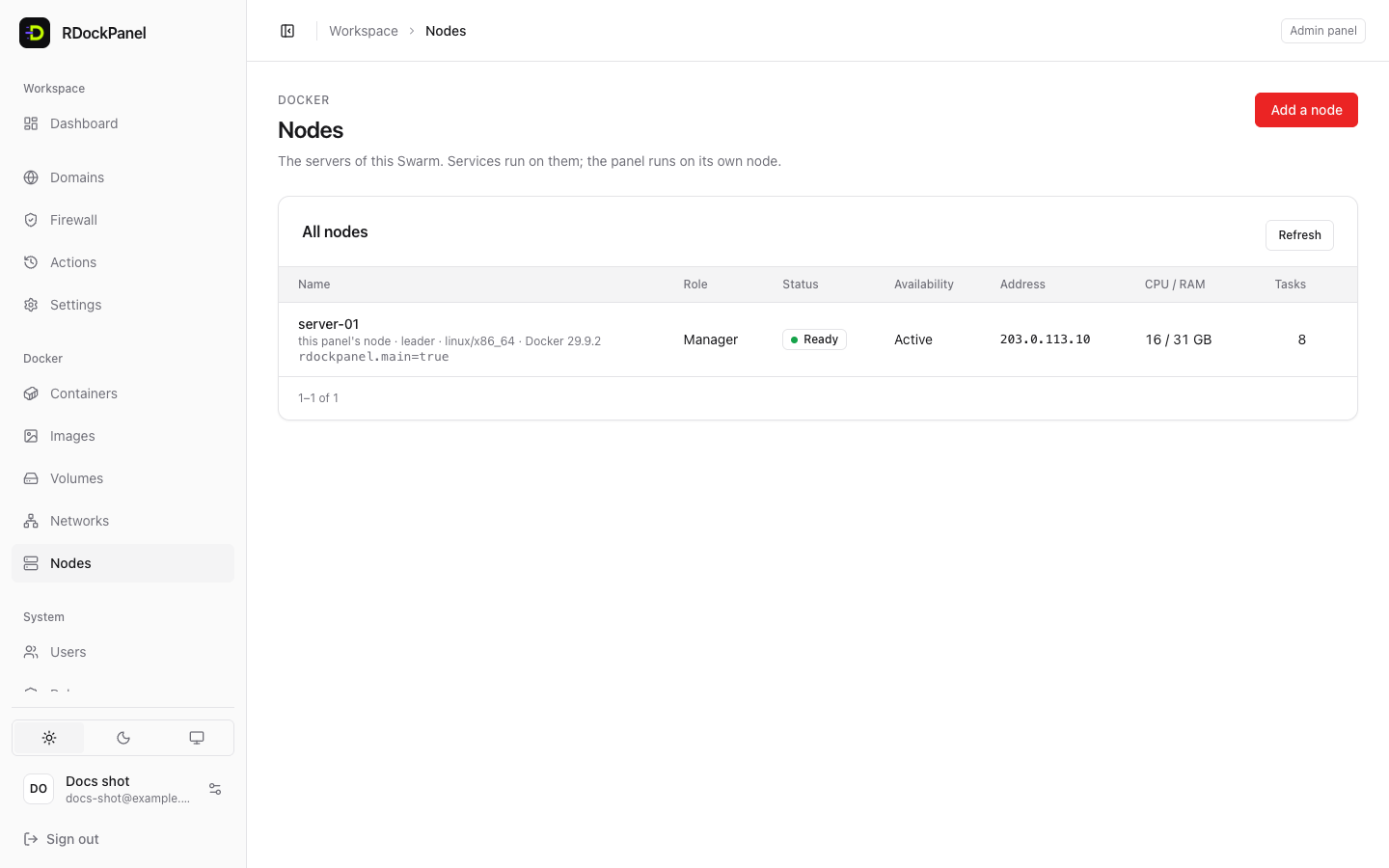
The table shows for each node: its role, status (Ready or Down), availability (Active, Paused, Drained), address, CPU and memory, and how many tasks run there. The panel's node says this panel's node; the manager in charge says leader.
Add a node
- On the new server, install Docker.
- Between the servers, open 2377/tcp, 7946/tcp and udp and 4789/udp (in your provider's firewall, between these servers only).
- If the panel's Firewall is on, turn it off: it works on one node only.
- In the panel, press Add a node and copy the command it shows:sh
docker swarm join --token SWMTKN-1-… 203.0.113.10:2377 - Run it on the new server. It appears in the list within seconds, Ready.
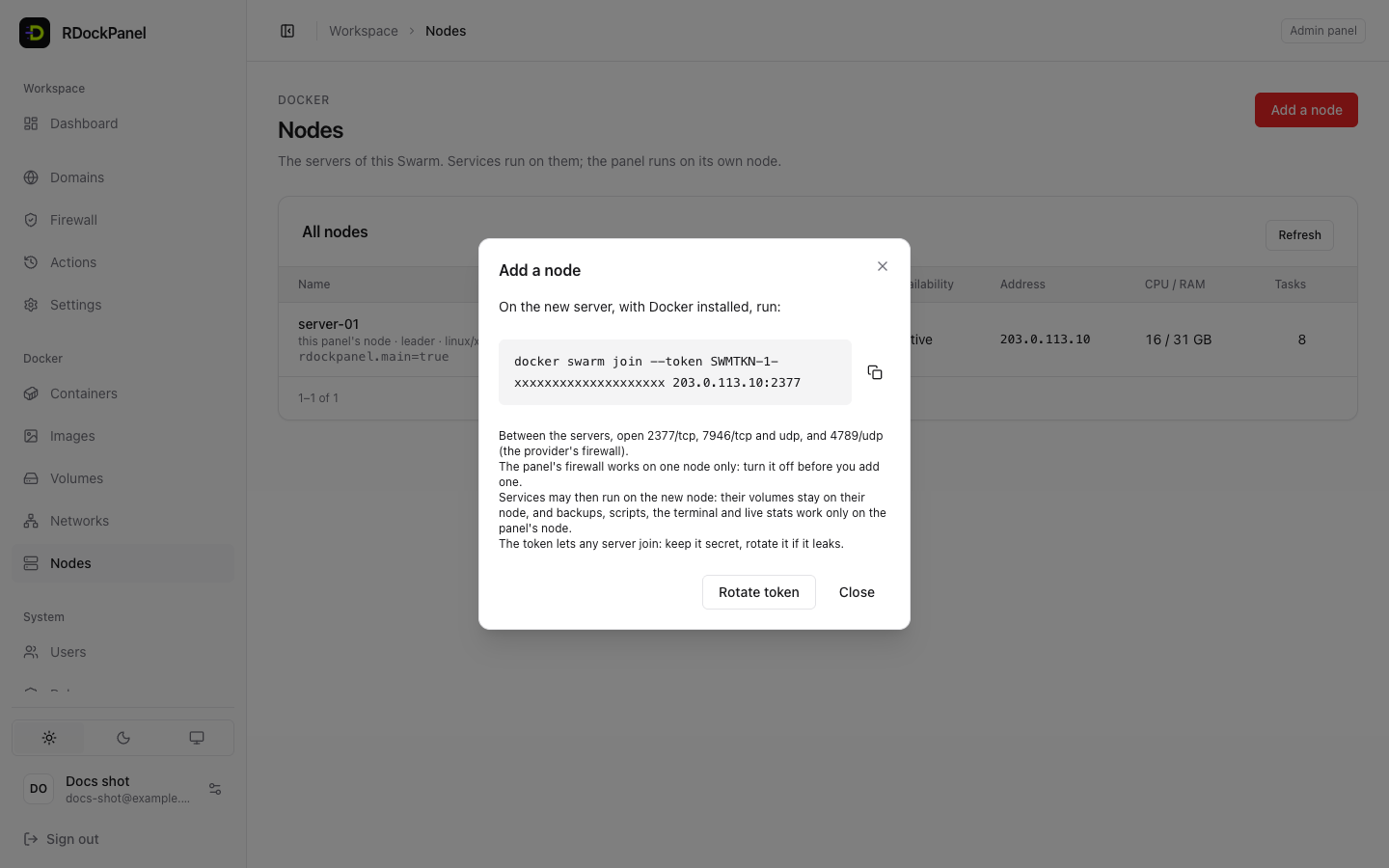
From now on, Swarm may run services on the new node (see what that changes).
The token is a key
Anyone with the command can join a server to your Swarm. Reading it is recorded in the audit log. If it leaks, press Rotate token: servers already in the Swarm stay, the old command stops working.
On a Mac
Docker on a Mac listens on 127.0.0.1 only: other servers cannot join it, and the dialog says so.
Pause, drain, activate
From a node's ⋯ menu:
| Action | What Swarm does |
|---|---|
| Pause | Keeps what runs there; puts nothing new on it. |
| Drain | Stops what runs there and starts it on another node when it can. |
| Activate | Accepts new tasks again. What moved away does not come back by itself (deploy a service again to spread it). |
Before draining, the panel lists what runs on the node and what will happen to each service:
- tied to this node: placed on it (Advanced → Runs on), or kept there because only this machine has its image or folder. It cannot move: it stays pending until the node is active again;
- its volumes start empty on another node: a volume lives on the node that made it;
- not the panel's: a Swarm service the panel did not make.
Use Drain before maintenance on a server (updates, a reboot), then Activate it.
Remove a node
- Drain it, so its services move first.
- On that server, run
docker swarm leave. Within a minute it shows Down. - In the panel, Remove… it.
Services placed on that node (Advanced → Runs on) fail their next deployment until you choose another node.
Limits
- The panel's own node is never paused, drained or removed.
- A manager is never removed here, and nodes are not promoted to managers (several managers need a majority to stay up: decide that with Docker yourself).
- Backups, restores, scripts, the terminal and live stats reach only containers on the panel's node.
What changes with several nodes
- A service with volumes keeps its data on the node it ran on. If it moves, it starts empty there unless the storage is shared. Fix a service's node in its Runs on.
- An image the panel builds, or one only this machine has, runs on the panel's node only.
- The panel's Firewall stays off (it refuses to apply with more than one node).
Who can do what
| Permission | May |
|---|---|
docker.view | See the list (the panel's own tasks are not counted). |
system.manage | Add a node (read the join command), rotate the token, pause, drain, activate, remove. Each is recorded on the Actions page and in the audit log. |